
Work Order Notification Rules, Visitor Mobile Numbers, and Email Branding
Version 1.254
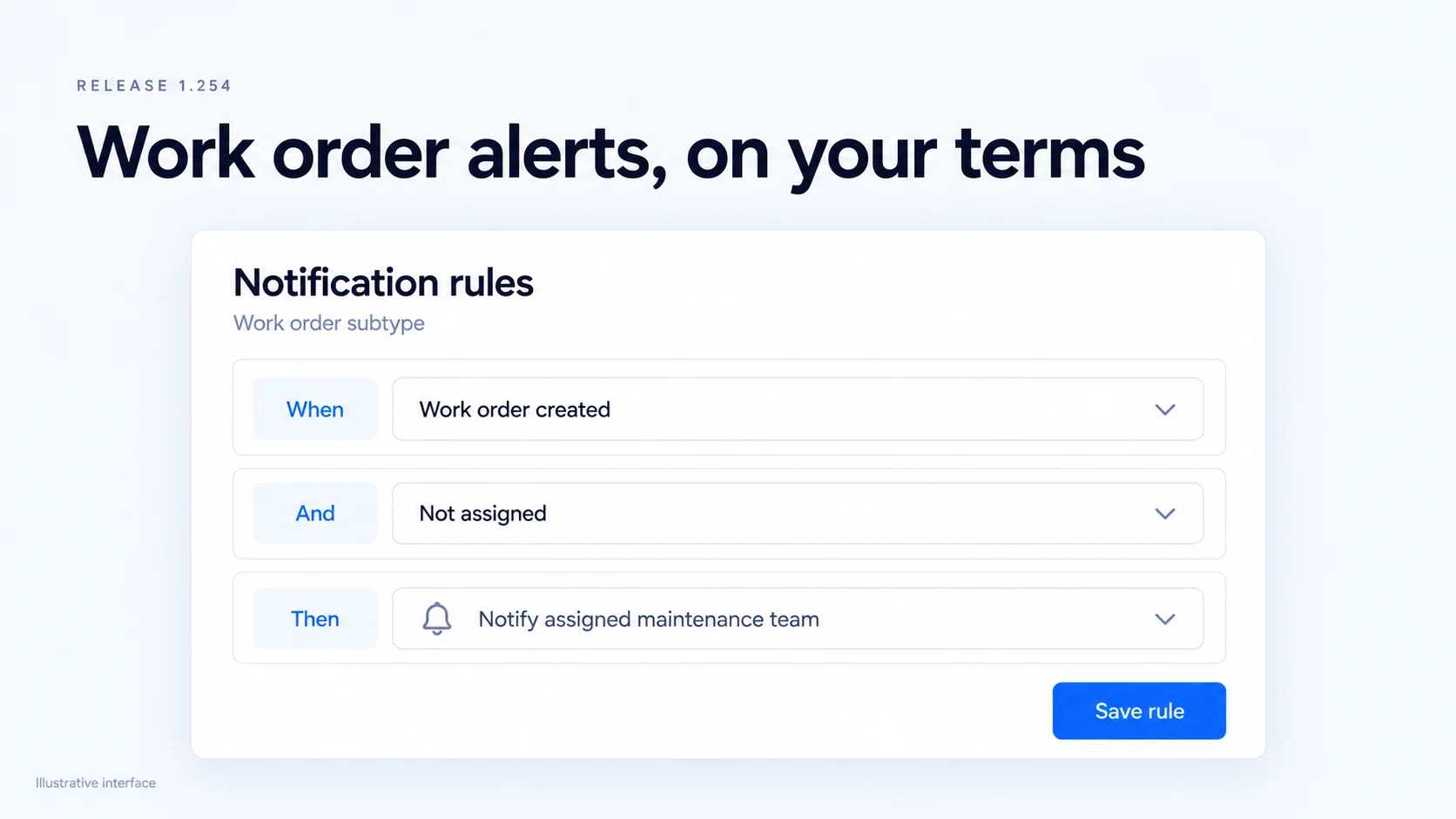
Smart Maintenance gets rules-based notifications on each work order subtype, and the categories, priorities, and statuses set up in Settings now drive work orders from routing to export. Visitors can be invited by text with mobile numbers from bulk import.
Packages, notifications, email branding, and visit times also received updates and fixes.
Work order notification rules
Building operators can now set notification rules on each work order subtype. Each rule reads as When, And, Then: pick the event (a work order is created, changes status, or is still not assigned after a wait), add a condition, and choose who hears about it. Rules can notify the assigned maintenance team and can wait before sending, so a reminder goes out only if nobody has picked up the work order. Every Smart Maintenance notification can now arrive by email, text, or push, based on each person's own channel settings.
Work order settings drive the whole workflow
Each subtype can now have a default assignee and a Route to, so new requests and work orders land with the right team or person without manual triage. The categories, priorities, and statuses a building sets up in Settings now power the work order list, its filters, and the CSV export, and status and priority can be changed right from the list. PM schedules use the same categories and priorities, so the work orders they generate match.
Visitor mobile numbers
Bulk visitor import now accepts mobile numbers. When a visitor has a phone number, the New Visit screen shows that their invite goes out by text, and Edit Visit shows the number instead of "No email or phone on file."
Improvements
- MaintenanceWork Requests
Added the option to promote a work request before the requester approves it, with a note that the requester can see.
- MaintenanceWork Requests
Added the source request number to work orders, and requests now close or cancel along with their work order, with a banner and history entry showing when.
- MaintenanceWork Orders
Updated work order detail to save each field as it changes, so there is no separate Update button.
- MaintenanceWork Orders
Added a confirmation before removing a work order subtype, and new icons for work order categories.
- MaintenanceBilling
Improved billing estimates so a blocked save highlights and focuses each line still missing a description.
- MaintenanceWork Orders
Updated the assignee picker to list default assignees first and explain when a restricted team has nobody assignable.
- ExperiencePackages
Added role-based control over who can add packages, change package settings, and delete packages.
- ExperiencePackages
Improved package links in email so they open the right package after sign-in and show a clear message if it no longer exists.
- ExperienceNotifications
Added Work Request events to the Configurations > Notifications page so each role's notifications can be turned on or off.
- ExperienceBranding
Added the building's footer logo to branded emails, and emails now use a sharper banner image.
 Maintenance
 Experience
Fixes
- AccessVisitors
Fixed visitors receiving a QR code that the turnstile denied when Genetec refused their cardholder group. The visit sync now reports the refusal instead of treating it as success.
- AccessVisitors
Fixed visit dates and times using the viewer's timezone instead of the building's. Visits now show and use building time.
- AccessVisitors
Fixed the visitor photo not filling in from a scanned ID. The face from the ID now becomes the visitor's photo.
- MaintenanceWork Orders
Fixed a crash when saving a work order category.
- MaintenanceWork Orders
Fixed the work order CSV export returning no rows when filtered by status.
- MaintenanceWork Orders
Fixed work order times showing UTC as if it were local time.
- MaintenanceWork Requests
Fixed the Closed and Cancelled filters on work requests returning no requests.
- MaintenanceWork Requests
Fixed a permission error message appearing on work requests for users without Work Order settings access.
- ExperienceNotifications
Fixed Android push notifications not being delivered.
- ExperienceNotifications
Fixed visit updates, visit cancellations, and personal amenity, parking, bike room, and package notifications reaching everyone with broad permissions instead of only the person they were about.
- ExperienceBranding
Fixed the Email Login URL in theme settings not saving.
- ExperienceNavigation
Fixed Work Orders and Assets disappearing from the menu when a parent menu item was stuck disabled.
- ExperienceTables
Fixed tables without paging showing only the first page of rows.
- ExperienceSign-in
Fixed users being sent to an error after their session expired. An expired session now refreshes and retries once.
 Access