
Inspections Settings, repeatable sections, and a new Vendor Management layout
Version 1.245 (1.245.4 to 1.245.14)
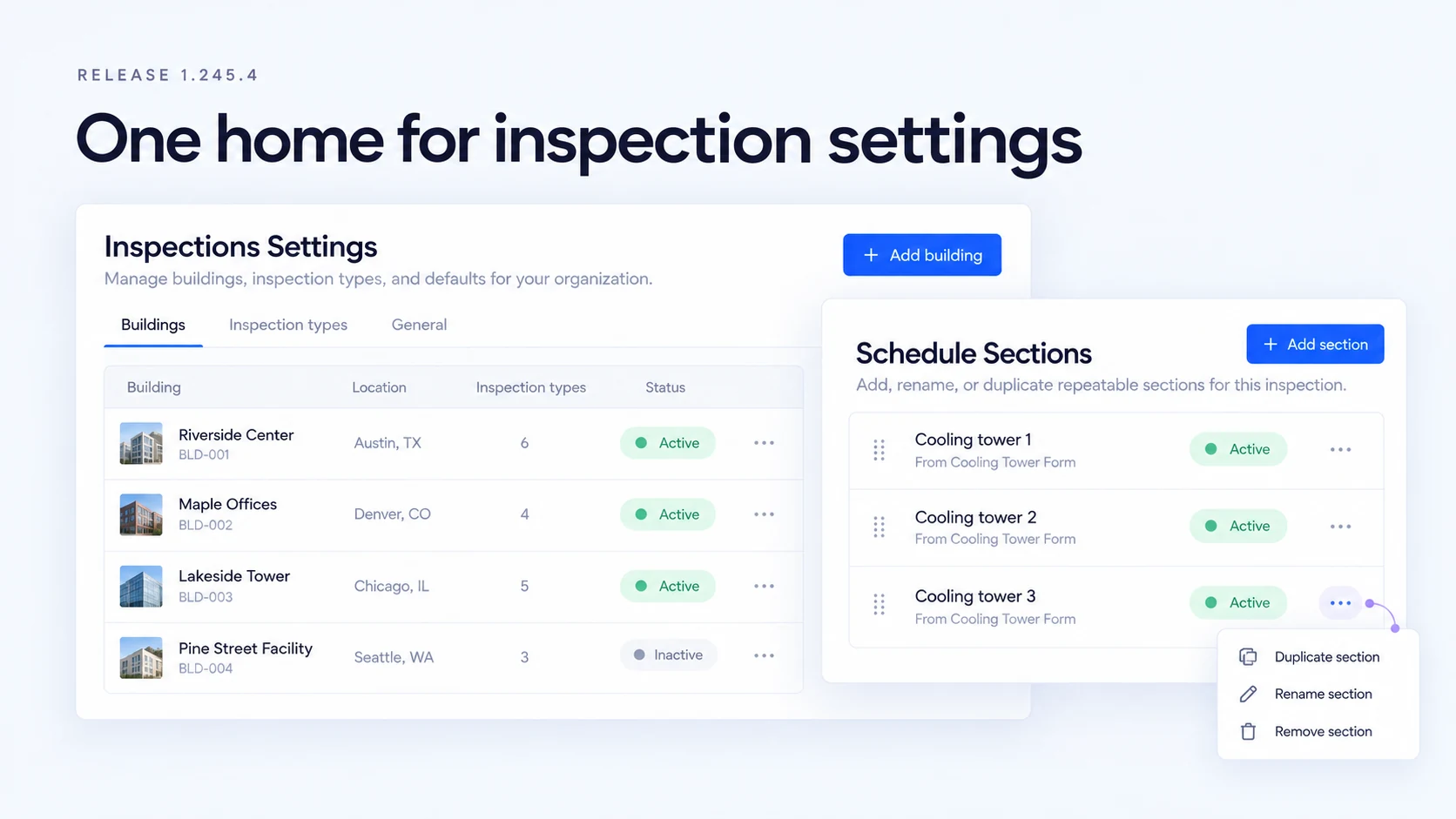
Inspections gets a Settings area for buildings, inspection types, and report defaults, all reached from the cog on the inspections list.
Sections can now repeat. A building with three cooling towers gets three named sections on the schedule instead of an inspector adding two by hand every visit, and each one shows up in the PDF.
Vendor Management moves to the Blueprint layout with a new certificate of insurance flow. Visit exports gain check-in and visitor type filters for event attendance reports.
Inspections Settings
A new Settings area, opened from the cog on the inspections list, puts buildings, inspection types, and defaults in one place. Building operators can manage each building's details, inspections, and schedules from its own page, assign forms to inspection types, and set a default disclaimer and cover image that pre-fill new buildings. Portfolio becomes a read-only view of the same buildings.
Repeatable named sections
One inspection can now hold several sections built from the same form, each with its own name, like three cooling towers or four air handlers. Set the sections up once on the schedule, then rename, duplicate, add, or remove them on site. Every section keeps its own answers, deficiencies, and sync status, and both PDF reports include all of them.
Vendor Management on Blueprint
Vendor lists, request details, and vendor create and edit move to the Blueprint layout. Certificates of insurance are added through a modal and shown as a list, with a clearer COI required toggle. Anyone who can view a request can now see its approval status, while approving and declining still need the right permission.
Fixes
- MaintenanceInspections
Fixed full inspection reports keeping only one submission per form, which dropped answers and photos from repeated units.
- MaintenanceInspections
Fixed the section header showing the form template name instead of the section's own name, and fixed a blank section loading answers from another section.
- MaintenanceInspections
Fixed Save being disabled on most existing buildings because their property type didn't match a fixed list.
- MaintenanceInspections
Fixed building image uploads failing on every attempt.
- MaintenanceInspections
Fixed the form library in the type manager always showing empty, and fixed new inspection types never appearing on any building's schedules.
- MaintenanceInspections
Fixed the Can Manage Portfolio Properties permission never taking effect, even for users who had been granted it.
- MaintenanceVendor Management
Fixed subcontractors not being removable when editing a submitted vendor request.
- AccessVisitor Management
Fixed visitor photos taken on iOS during check-in saving sideways.
- AccessVisitor Management
Fixed editing a visit overwriting who originally invited the visitor.
- ExperiencePackage Management
Fixed the package count showing only part of the packages on file.
- MaintenanceWork Orders
Fixed font rendering on the new work order screen.
- MaintenanceInspections
Fixed the Deficiencies tab showing empty and inspection submissions not appearing when a load took longer than 10 seconds.
- MaintenanceInspections
Fixed the sections and deficiency lists showing their empty state while still loading.
- AccessRoles & Personas
Fixed the horizontal scrollbar on the Roles and Permissions page, which left most of the permissions table out of reach.
- MaintenanceWork Orders
Fixed a failed billing details save showing a success message and clearing everything you'd entered.
- ExperienceMenu Configuration
Fixed menu configuration creating duplicate rows on save, which could stop the menu from loading. Each menu item now saves once, and role access carries over when duplicates are merged.
- ExperienceMenu Configuration
Fixed inline editing in the menu tree picking the wrong item when duplicate entries were present.
- MaintenanceInspections
Fixed inspection PDF reports printing the building name twice in the page header.
- MaintenanceInspections
Fixed inspection PDF reports adding a blank disclaimer page when the building has no disclaimer set.
- AccessVisitor Management
Fixed the "Other" permitted ID type setting, so buildings that allow non-standard government IDs can now admit them at scan.
- AccessVisitor Management
Fixed ID scans not filling in the visitor photo and not loading the right reader for the configured scanner type.
- AccessVisitor Management
Fixed the walk-in photo requirement being skipped when the add-visitor drawer was closed and reopened.
- AccessVendor Management
Fixed vendor request and check-in times showing in the wrong time zone when the building's time zone wasn't cached.
- ExperienceBuilding Setup
Fixed the Wi-Fi visibility toggle turning itself back on after you saved Building Info.
- ExperienceAmenity Management
Fixed the amenity breadcrumb changing the capitalization of amenity names.
- ExperienceEvents
Fixed event detail hero images showing as a blurry low-resolution crop.
- MaintenanceWork Orders
Fixed due date and date modified labels rendering in bold on Android work order cards.
- MaintenanceInspections
Fixed the default report cover image and disclaimer from Settings > General only reaching buildings created after they were set. Existing buildings without their own now use the defaults too.
- MaintenanceInspections
Fixed inspection report covers printing blank when they used the default cover image.
- MaintenanceInspections
Fixed the report disclaimer page breaking lines in odd places. Each paragraph now wraps cleanly with real spacing between them.
- ExperienceMass Notification
Fixed email addresses added in the rich text editor opening a blank browser tab or a broken link instead of your mail app. Web links still open in a new tab.
- AccessVendor Management
Fixed vendor check-in times showing hours off from the building's local time, so a 2:35 PM check-in no longer reads as 10:35 AM.
 Maintenance
 Access
 Experience
Improvements
- AccessVisitor Management
Added Check-In Status and Visitor Type filters to the visit CSV export, pre-filled from what's on screen, so you can pull an event attendance report in one step.
- AccessVisitor Management
Updated visit locations to include the floor with the space name in visitor emails and calendar invites.
- MaintenanceInspections
Updated the building property type to accept any value, with suggestions from the types already in use.
- MaintenanceInspections
Updated inspection type deletes to say why a type can't be removed, such as when schedules still use it, instead of asking you to try again.
- MaintenanceInspections
Improved the inspection types list by combining it into a single view in Settings.
- AccessVisitor Management
Added Visitor Types to one more building, so its front desk can tag each visitor by type at check-in.
- AccessVisitor Management
Added a visitor mobile number field at check-in, shown on the visitor detail view.
- MaintenanceInspections
Improved inspection settings to open types and buildings read-only first, apply one type across several buildings, and bulk delete types.
- AccessVisitor Management
Improved the check-in button tooltip when a visitor is waiting on watchlist approval, so staff know why check-in is blocked.
- MaintenanceInspections
Added loading states to the sections and deficiency lists, so a slow load no longer looks like an empty list.
- MaintenanceInspections
Updated the add-building billing confirmation to point you to your account representative or Customer Support with billing questions.
- MaintenanceInspections
Updated inspection report covers to show the report name in the cover space when a building has no image, instead of a blank panel.
- MaintenanceInspections
Updated inspection settings to hide cover image uploads for now, since uploaded images couldn't print on reports yet.
- ExperienceBranding
Updated highlighted text to use your browser's standard selection color, so selections stay readable on every building's brand colors.